


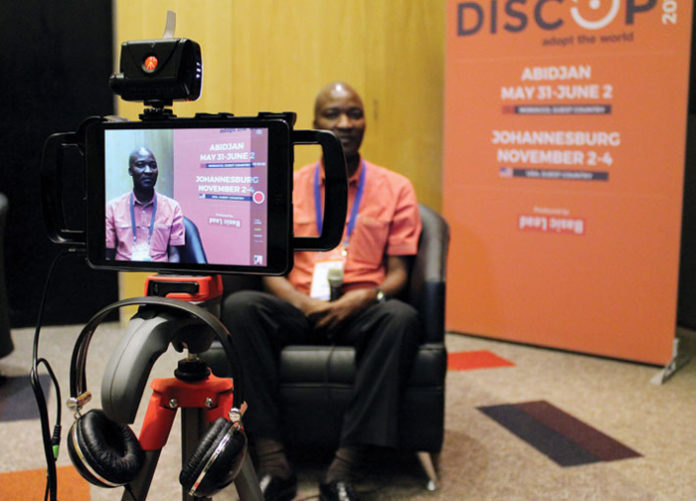
Mobile technology is changing the way journalists gather news. Screen Africa’s Carly Barnes recently spent time mastering our newly acquired mobile journalism (MoJo) kit and spoke to Visual Impact’s Marius van Straaten about this growing practice, learning some of the tricks and testing the latest gear.
I’ll admit it: I’m old school when it comes to most things. I have a boxy TV, a phone that makes most of my peers cringe and a severely neglected Twitter feed. But there are some things, some technological advances, which can really conjure up the kid in me. As a journalist I’ve always considered my essential tools to be a pen, a notepad and a curious mind; but in recent years the news reporting space has become so dynamic and innovative that keeping up with the latest storytelling tech is not just a professional bragging right, but a crucial instrument in captivating today’s content consumer.
People now get their news on different devices and from so many different places that it has fundamentally changed the way in which journalism is produced. Media is adapting to produce news in formats that work best for these gadgets and for the attention deficit audiences they serve. Short-form video in particular is being used more and more as a means of communicating stories in a visual, time efficient (not to mention cost efficient) way. Therefore the global explosion of Mobile Journalism (MoJo) – and an array of gear – transforms journos like me into video content producing machines.
Smart ass-ets
While there are so many DSLRs on the market that provide great on-the-go capabilities for reporters, the most convenient, quick and intimate solution is usually already in your bag or back pocket. Marius van Straaten, director at Visual Impact, online content creator and film lecturer, has been hot on this trend since it first emerged, and explains: “Device cameras are so small and unassuming; people are generally more comfortable around them compared to traditional video cameras or DSLRs. With smaller kit you end up getting better performances or more revealing content than you would otherwise get with a more expensive camera.”
So what does a good MoJo starter kit look like for a phone or tablet? The first thing you’ll need is a phone holder or ‘cage’ that you can mount on a tripod. Van Straaten likes ALM’s MoJo starter kit for the iPhone 6, which includes a phone holder with points to attach lightweight LED lamps and microphones to, a wide angle/macro combo lens, a Rode handheld microphone and an adaptor cable for microphone compatibility. Screen Africa is using a cage from iOgrapher, which holds iPads and iPad Minis.
In addition to the cage, you’ll also need:
- An additional power pack, as a camera phone uses lots of power.
- A lightweight tripod with an adjustable head.
- An LED lamp with extra batteries and (if you’re looking for that little extra touch) a five-in-one reflector.
- An attachable telephoto lens – most phones and devices come with a wide angle lens.
- Microphones – rifle, handheld and lapel – surprisingly and conveniently, in most cases all you need to do is plug these babies in using an XLR adapter and you’re good to go. Explains van Straaten: “I like having all three in my kit, but if budget is an issue I prefer a handheld. The rifle is good for on the camera if I am moving around and shooting content, but not for interviews. Lapel mics are great for single interviewees and handheld is great for more than one interviewee because they can pass the microphone around.”
Interviewing tips
While setting up (which takes only a few minutes), there are a couple of things you need to consider from a technical, creative and professional point of view. Film is an artistic endeavour in any environment and so different techniques can instil different emotions and perceptions in a viewer. Set your tripod up so that the device is close to you and at eye line with your subject. It’s good to change the eye line angle (left to right or right to left) in different videos to create visual diversity for your viewers. Leave three fingers headroom (maybe more if your subject is particularly animated) and enough looking room from the eyes to the edge of the frame. Higher or lower camera angles can give a subject more or less authority. It’s also about making sure your subject is at ease and relaxed – you don’t want to intimidate by speaking down to them.
Shooting on devices means close ups and mid shots are ideal. Think pectorals upwards, because your viewer won’t be able to see as much detail as they would on a big screen. And remember to capture a few cutaways to give your interview context and increased engagement.
Finishing and distribution
As with most things, the best approach to MoJo post is to keep it simple, by using amateur-friendly apps like iMovie which is free for Apple users. Says van Straaten: “The new version of iMovie is something else. It is a huge leap over what Apple had before and moves them to the front of the pack for editing on a mobile platform, though we still think highly of Pinnacle Studio and Touch Edit for high end mobile alternatives.”
Getting your content out there also requires some time and thought – you do after all want your videos to be easily accessed and sharable, and metadata plays a big role in this. Give your video a concise description and make sure you include links to all your relevant online platforms. Supply sufficient keywords and allocate a language and a location. You can even further your audience reach by applying YouTube’s translation tool. Once your video is loaded you need to get it out to the rest of the world and Van Straaten, who also creates content for an online TV channel, advises: “Post the video link on open and interested Facebook pages; advertise the video in your twitter feed; or use paid Facebook advertising to promote the video link.”


