


Screen Africa’s resident technophile Ian Dormer offers support to all those who have run afoul of the seemingly simple, yet often maddening ins, and outs of asset management – from acquisition to archiving.
My name is Ian and I am a… media manager. With a plethora of codecs, quick data transfer for dailies, transcode queues and watch folders, managing media these days has become increasingly tricky and quite often, one feels the need for group support and advice from kinfolk of common suffering.
We no longer shoot projects with just one camera. Low-cost B cameras, action cams and slomo cams have added to the gigabytes of data we film on a daily basis. We are producing multiple versions of each project to accommodate different platform types and almost every project is being re-versioned three or four times for the needs of broadcasters.
While there are a growing number of tools available to make the media management process a whole lot simpler, there are a few components that curators of said media need to deal with… and these are the human (error) component, capacity (limitation) component and technology (failure) component. It’s enough to drive you to drink, but if you follow a simple 3-2-1 backup strategy as a starting point of your own 12-step backup programme, you’ll easily prevent yourself falling off the rails.
As the number of video, audio and graphic assets grow, so has the need to organise this content efficiently. Too often, stakeholders have a hard time finding the content they need – and when they can find it, it’s often not in the right format, or there are multiple versions with no indication of which is the final one approved for publication. Managing media and the subsequent archiving of it has been discussed at length in previous issues and while there is no definitive ‘best overall system’ out there, we all have our favourites for various reasons. Media management in the entertainment industry is so necessary now that many universities around the world are offering specialist MBA degrees in digital media management and associated technology management.
It doesn’t take a degree to realise that following the basic rules of backing up data in any form, be it newly acquired or media ready for archiving, is essential. Most disasters and media loss occurs through simple human error and not backing up. Media is not safe media unless there are three copies of it. IT professionals have long promoted a 3–2–1 backup strategy for secure, redundant backup of your data, and it certainly applies in the entertainment industry. 3 backups of your data, on 2 types of media, 1 of those off-site.
Recent ‘cloud’ developments have introduced exciting options for off-site storage as part of your plan. Companies like Backblaze and Crashplan allow subscribers to store unlimited amounts of data on their servers. It’s a great way to go and covers the ‘2 types of media’ and ‘1 off-site’ parts of your 3-2-1 strategy. There is a downside though; depending on your broadband speed it could be slow to upload to and retrieve – so beware if you need it in a hurry.
Media management 101
Media management starts in the acquisition phase. Camera generated metadata adds critical information that can be used further down the line in a number of processes in post production.
Silly as it may seem, making sure the camera’s system date and time are correct often proves invaluable when recovering data for a specific shot later down the line. As most RAW formats are not really suited for editing (in general) I always advise people to rename the RAWs per project using a production code (there are numerous software packages around that will do this for you in batches.
Adobe Bridge is a good example and is really intuitive and easy to use). Back them up to secondary hard drives and LTO (safe back up) and then transcode the media to your user-friendly in-house codec for post purposes.
Don’t use the old ‘Final Cut’ way of naming your clips eg: 09 – Day 2 – Cape town International Airport – sunny morning pan left to right, rubbish audio on channel 2 (yes people do this). Windows does not like this long naming style and most tape back up systems will reject anything too long. This kind of detail should be done in logging within your media asset management programme or your edit software.
I have adopted a simple 10 letter/number code that has to date provided a fool proof method that just works. Using a Random Code Generator (software package) each production is allocated a 4-digit code. For demo purposes I have generated the random code sQR4, which is my production code for a shoot done in the Antarctic recently. There were seven cameras and two audio recorders on the four-day shoot. Each camera and audio device gets a letter of the alphabet associated to it. The shoot days are also allocated a letter of the alphabet. Each clip is renamed with the Shoot Code (sQR4), Device code (eg Alexa = A) and Day Code (eg Day 2 = B) and then a four-digit number sequence starting at 0001 – resulting in a 10 digit string sQR4 AB0001 (Antarctic, Alexa, Day2, Shot 1)
Table 1
The result is that if I need to recover sQR4 FD 2136, I know from my methodology that it was from the Antarctic shoot, Drone camera on Day 4 shot number 2136. This style of naming clips can easily be adapted to edited sequences, output files, finished programmes etc. It is simple but it works and integrates into all MAM software packages where you can log and tag for quick and easy retrieval and track the assets through various stages of production.
Capacity limitations
As technology develops new devices and methods of managing data and archiving data evolve. The traditional spinning hard disk drive (HDD) is slowly being edged out of the storage market– at least in terms of capacity. Eight terabyte (TB) drives are in develoment but, judging by the technology forecast, it is possible that 10TB’s might be the limit for HDD. Solid state drives (SSD’s) are increasingly getting faster and more rugged, however there are minor issues with lifecycles and therfore longevity of the product. SSD or flash capacity is due to surpass that of HDD with tests currently being conducted on a 30TB SSD due for release in around 2018. SSD costs are calculated to drop to around US$0.12 per GB by then making solid state a more cost effective, faster and potentially more stable option to spinning disk. Imagine a single 16 bay raid unit housing 480TB of SSD storage! The competition between flash and hard disk-based storage systems will continue to drive developments in both. Flash has the upper hand in performance and benefits from Moore’s Law improvements in cost per bit, but has increasing limitations in lifecycle and long term reliability.
LTO tape is still my preferred choice for more permanent archiving and the launch of LTO 7 has increased both speed and capacity for archiving and retrieval. The LTO product roadmap programme has in fact already included generations 9 and 10. LTO-9 will offer up to 25 TB of native capacity and LTO-10 will offer 48 TB. Transfer rates are expected to increase at a larger rate than previous generations. LTO-9 and LTO-10 will offer transfer rates of 708 MBps and 1,100 MBps, respectively and new magnetic coating technology on the tape itself means the shelf life will be longer.
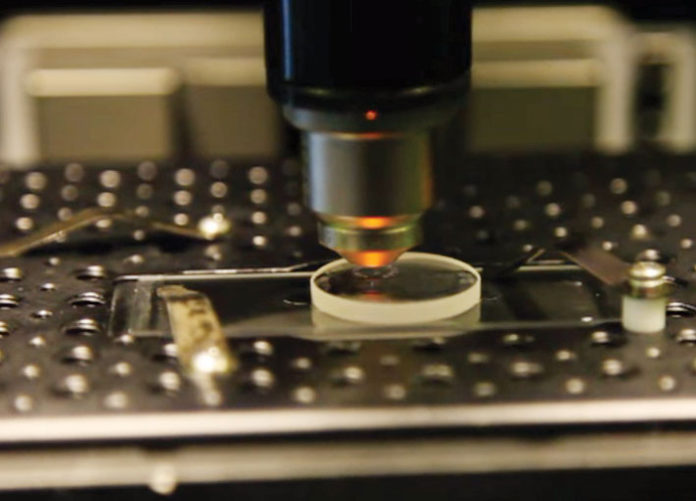
Speaking of longevity, scientists at the University of Southampton have made a major step forward in the development of digital data storage that is capable of surviving for billions of years. Using nanostructured glass, scientists from the University’s Optoelectronics Research Centre (ORC) have developed the recording and retrieval processes of five dimensional (5D) digital data by femtosecond laser writing.
The storage allows unprecedented properties including 360 TB/disc data capacity, thermal stability up to 1,000°C and virtually unlimited lifetime at room temperature or 13.8 billion years at 190°C, opening a new era of eternal data archiving. 5D data storage obviously has potential as an archival format for museums and galleries, but the scientists involved believe it could be also be commercialised in the not-too distant future.
So the future has been sorted and I am happy – my files are safely transcoded, logged, backed up and archived so I can sit back and relax and I think I’ll have that drink now…cheers!
